OneSignal Setup

Push notifications are a powerful feature to engage your app users. By integrating OneSignal’s SDK, WebToApps enables full support for native push notifications on Android and iOS platforms.
1. Why OneSignal?
- Feature-Rich Platform – OneSignal provides a wide range of powerful tools, including segmentation, automation, A/B testing, message scheduling, and personalization to help you deliver highly targeted and effective push notifications.
- Generous Free Tier – Perfect for small to medium apps, OneSignal offers a free plan that supports up to 10,000 subscribers. You get access to core features without needing to commit to a paid plan right away.
- Cross-Platform Support – Send notifications across Android, iOS, web, and other platforms from a single dashboard. This unified approach helps manage campaigns easily and ensures consistent messaging across devices.
- Easy Integration – OneSignal provides robust SDKs, clear documentation, and a developer-friendly setup process. WebToApps includes native integration, so setup is simplified and optimized for mobile apps.
- Real-Time Delivery – Push notifications are delivered quickly and reliably using OneSignal's globally distributed infrastructure. This ensures your users receive time-sensitive alerts when they matter most.
- Dashboard & API Access – Send and manage push notifications using a visual dashboard or integrate programmatically using OneSignal’s well-documented REST API. This flexibility suits both non-technical and advanced users.
2. Setting Up Your OneSignal Account
WebToApps uses OneSignal’s powerful push notification service to enable native push notifications in your mobile app. OneSignal offers an enterprise-grade platform with a feature-rich interface and a generous free tier, making it suitable for apps of all sizes.
To begin, simply create a free account at OneSignal.com . This will allow you to manage, send, and track push notifications for your WebToApps-powered mobile application.
3. Configure OneSignal for Android
OneSignal delivers push notifications on Android using Google’s Firebase Cloud Messaging (FCM) service. To enable this, you’ll need to provide OneSignal with your Google Project ID and Firebase Server API Key.
A complete step-by-step guide is available on OneSignal’s documentation: Generate a Google Server API Key .
If you already have a Google Developer account, you can generate your Project ID and FCM Server API Key directly here: Firebase Console for Android .
4. Configure OneSignal for iOS
OneSignal sends push notifications to iOS devices using Apple’s APNs (Apple Push Notification Service). To enable this, you’ll need to upload your Apple Push Notification certificates to OneSignal.
These certificates can be generated from your Apple Developer account at developer.apple.com .
For a full walkthrough on how to create and upload the certificate, refer to OneSignal’s official guide: Generate an iOS Push Certificate .
5. Configure Your WebToApps Mobile App
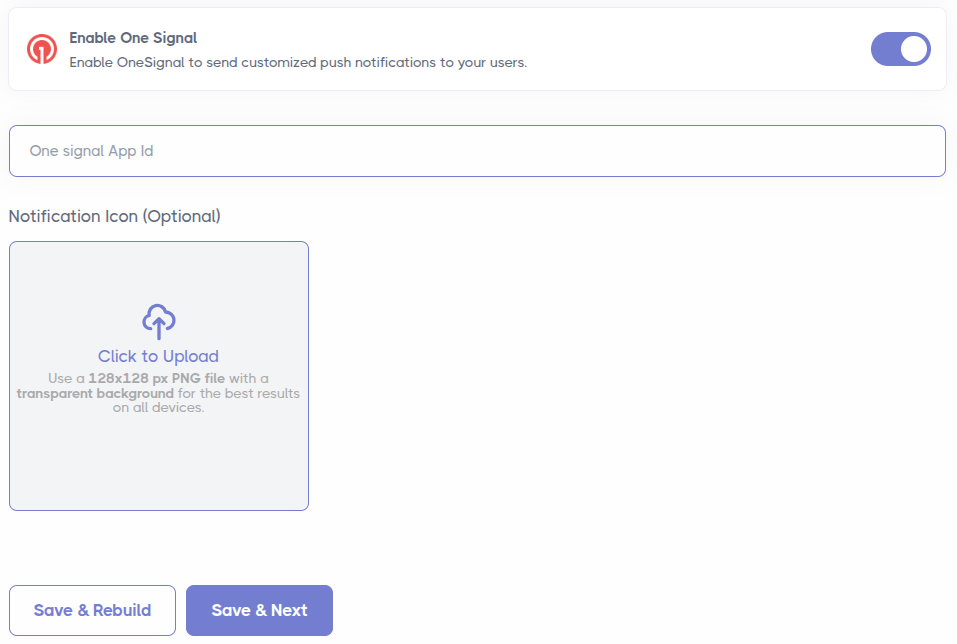
WebToApps requires just your OneSignal App ID and an optional notification icon to configure push notifications within your mobile app.
You can find your App ID by navigating to the OneSignal Dashboard → App Settings → Keys & IDs.
Once you have your OneSignal App ID, add the details on webtoapps.com and rebuild your application to apply the configuration.
6. Important Note on SDK Integration
WebToApps uses the official OneSignal SDKs for both iOS and Android. These are fully integrated for you automatically—no manual setup is required.
Please note that using OneSignal’s Web SDK within your WebToApps mobile app will not work for sending native push notifications.